Touch typing technique
Touch Typing
Touch typing improves typing speed and accuracy. A touch typist never looks at the keyboard. The fingers hit the right keys by force of habit. The typist is entirely focused on the text being typed, reading the words and phrases as the fingers type the text reflexively. Touch typing can be learned by performing special exercises.
Stage one of the process begins with learning the home row of the keyboard (the row beginning with the Caps Lock key). Looking at the keyboard is strictly forbidden. This is followed by learning the lower and upper rows, the numbers row, upper-case letters and special symbols.
Stage two involves memorizing frequently used syllables and typing words containing these syllables.
Stage three involves typing actual text to perfect the skills acquired.
Touch typing technique
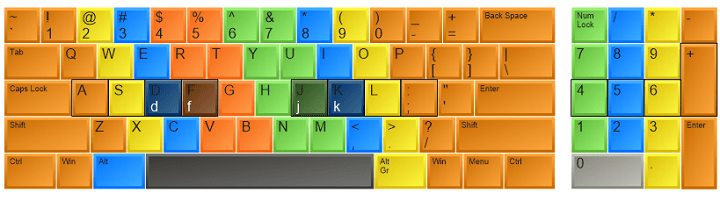
- Typing zones for each finger. The F, D, S, A, and J, K, L, ; keys (on a QWERTY keyboard) represent the base position. Keyboards usually have small protrusions on the F and J keys. They help your fingers locate the base position without looking at the keyboard. Try to return your fingers to the base position after each keystroke.
- Typing zones for each finger. Colour coding shows which finger should press each key ( see the picture above ). The left index finger is reserved for all the red keys. The right index finger is reserved for green keys, and so forth. Use the thumb of whichever hand is more convenient for you to press the Space key.
- The base position on the numeric pad is the number 5 key for the middle finger, 4 for the index finger, and 6 for the ring finger. The numeric pad simplifies and speeds up numerical data input.
- Upper-case letters and symbols appearing on keys in the numbers row are typed by one hand with the little finger of the other hand holding down the Shift key.
- Do not look at the keyboard. Try to locate the right key with your fingers.
Advice for successful touch typing practice
- Do not rush at the early stages of learning. High speed makes sense only when the fingers can hit the right keys by force of habit. Take your time when typing to avoid mistakes. The speed will pick up as you progress.
- You should establish and maintain a rhythm while typing. This means that keystrokes should come at equal intervals.
- Hit keys only with the fingers for which they have been reserved.
- Limit your hand and finger movement only to what is necessary to press a specific key. Keep your hands and fingers close to the base position. This improves typing speed and reduces stress on the hands.
- Don't look at the keys when you type. Just slide your fingers around until they find the home row marking.
- Don't hammer on the keys. Try using the minimum force possible.
- To switch between upper/lower case always use the opposite hand.
Correct position of the hands and body
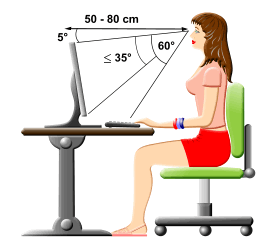
Right Position
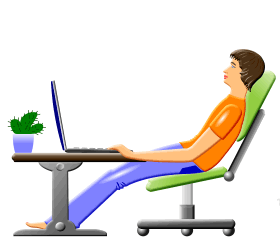
Wrong Position
- While at the computer, sit straight (see the picture above). Always remember to keep your back straight.
- Keep your elbows bent at the right angle.
- Face the screen with your head slightly tilted forward.
- There should be at least 20-30 inches of distance between your eyes and the screen. In other words, your outstretched arm should barely touch the screen.
- The optimum height of the tabletop or under-desk keyboard drawer is 28 to 30 inches from the floor.
- The chair and table height should be chosen so as to expose the shoulder, arm, and wrist muscles to the least possible strain. The wrists can touch the tabletop in front of the keyboard. Never shift even a portion of your body weight to the wrists by resting on them.
Be patient and practice as often as possible. Despite the simple Touch typing technique, it takes some time to gain high speed. By following the rules, you will see your speed and accuracy improve over time.
Typing Games

Rapid Typing Reviews
good